

This is my attempt at understanding what the newly announced Vera Rubin NVL72 rack from Nvidia, an AI factory training and inference power-house, contains. I have pieced it together from several places, and don’t think it’s too difficult for anyone with a passing knowledge of GPU architecture to understand it. Nvidia uses the terms Vera Rubin platform to describe the entire platform.
The terminology: Vera and Rubin
Vera is the name given to the custom CPU chip Nvidia uses inside the Vera Rubin (VR) platform. It is an ARM-based CPU platform with custom Nvidia designed cores called Olympus. There are 88 custom Olympus cores in one CPU designed specifically to link up with Nvidia’s GPUs using their NVLink-C2C connect technology.
Rubin is the name of the GPU Nvidia uses inside the VR platform. It is designed to work hand-in-hand with Vera CPUs inside the platform. Together, but along with other elements, they make up the Vera Rubin platform.
NVL72 Rack
This is what the Nvidia NVL72 rack looks like in short:
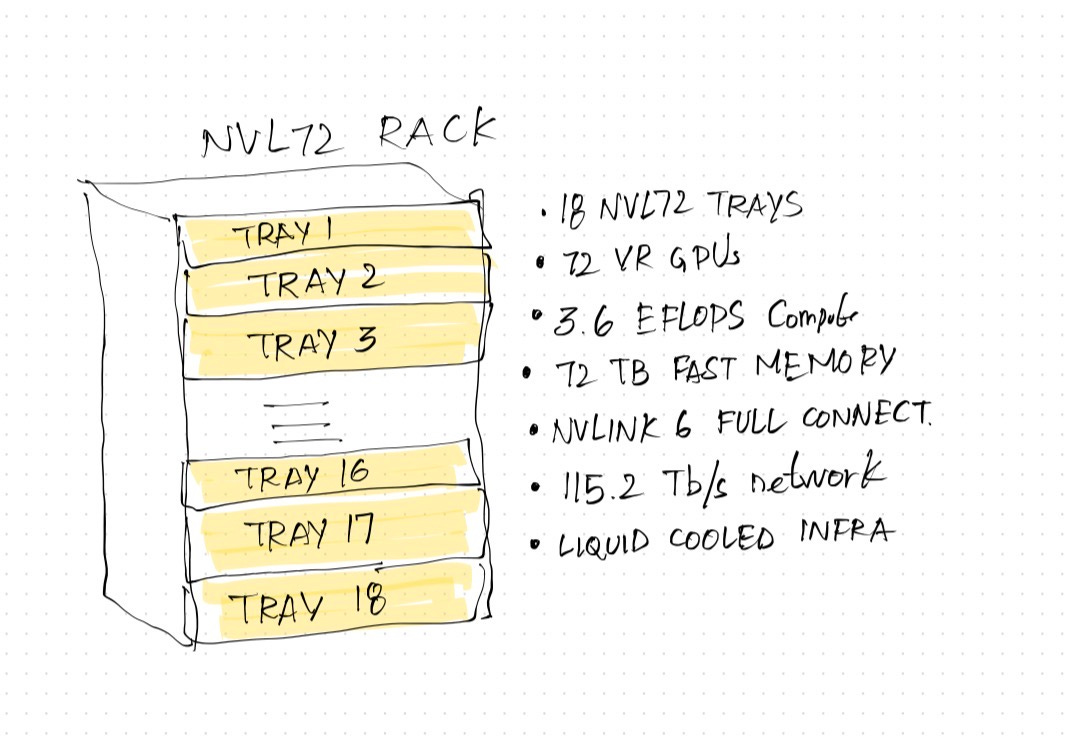
This rack, 100% liquid cooled, has 18 trays known as Nvidia NVL72 compute trays. It is a powerhouse of compute, storage and networking, designed for running big AI factories. The rack is the easiest to understand. The picture above is self-explanatory. I will spend more time looking into what is inside the compute tray and the different elements that make all of this possible.
Vera Rubin Superchip (host)
Before I explain the compute tray, I'll talk about the Vera Rubin Superchip.
Here’s a quick look at what makes the Vera Rubin Superchip:
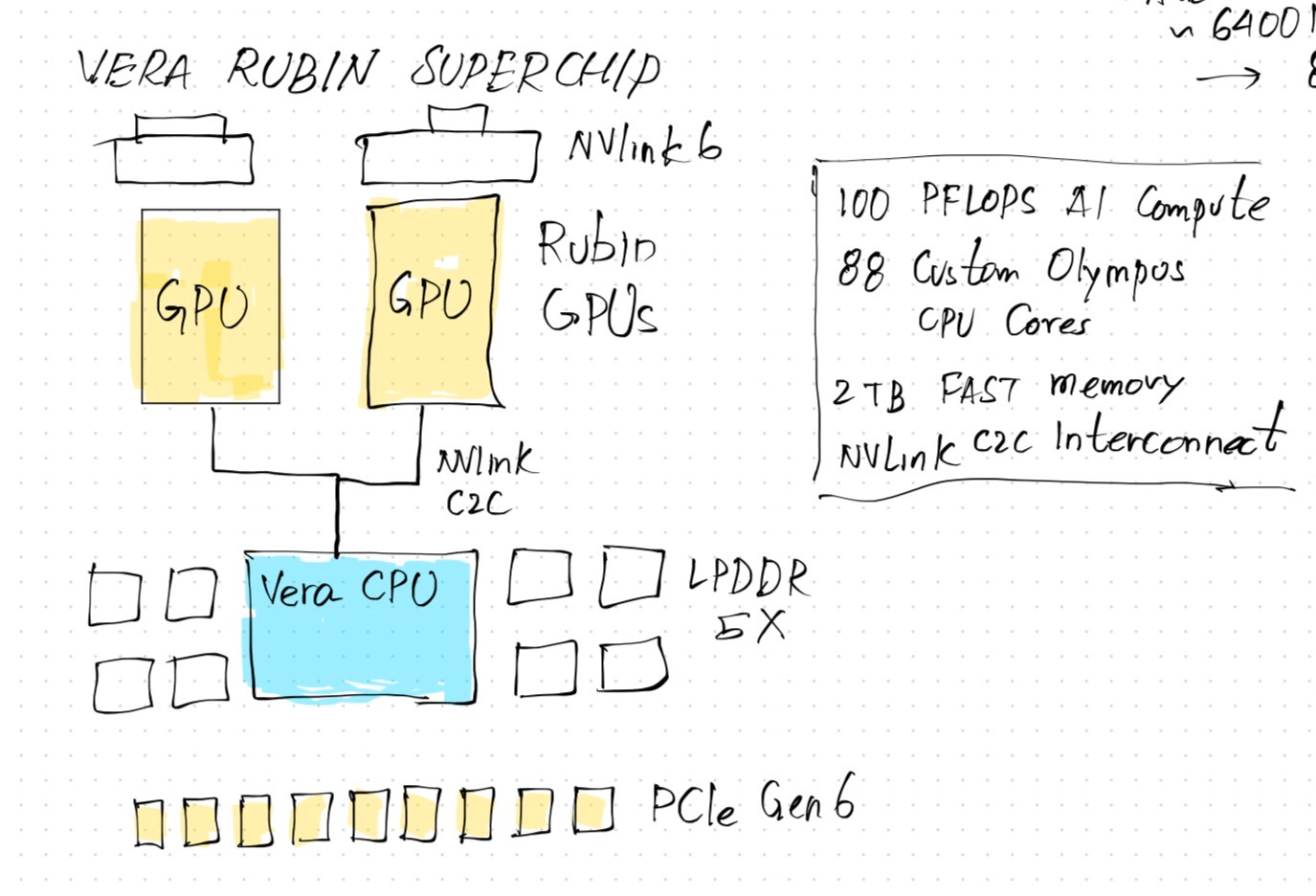
A single VR superchip is also called a “host”. The LLM runs inside this. It is where all the prefill and decode happen. (I wrote about prefill and decode on the post below if you are not familiar with these important terminology.)

This is also where the primary KV cache is kept (although the VR platform offers an improvement on this). The superchip is composed of the following:
2x Rubin GPUs with access to multiple high bandwidth memory (HBM) modules.
1x Vera CPU with 88 custom Olympus cores. These are known to provide 100 PetaFLOPs of AI compute capability.
NVLink C2C to run the GPUs hand-in-hand with the CPU.
Access to fast LPDDR5 memory modules on the host.
NVMe SSDs for local storage on the host.
Fast Generation 6 of PCIe for peripheral connectivity and compatibility.
NVLink 6 to connect the two GPUs together with low latency, fast access.
This single superchip in the VR platform does most of the AI heavy lifting. Two of these superchips are then combined with several other elements to make an NVL72 compute tray, which is then fitted into an NVL72 rack.
NVL72 Compute Tray (infrastructure for host)
Here’s what the compute tray looks like:
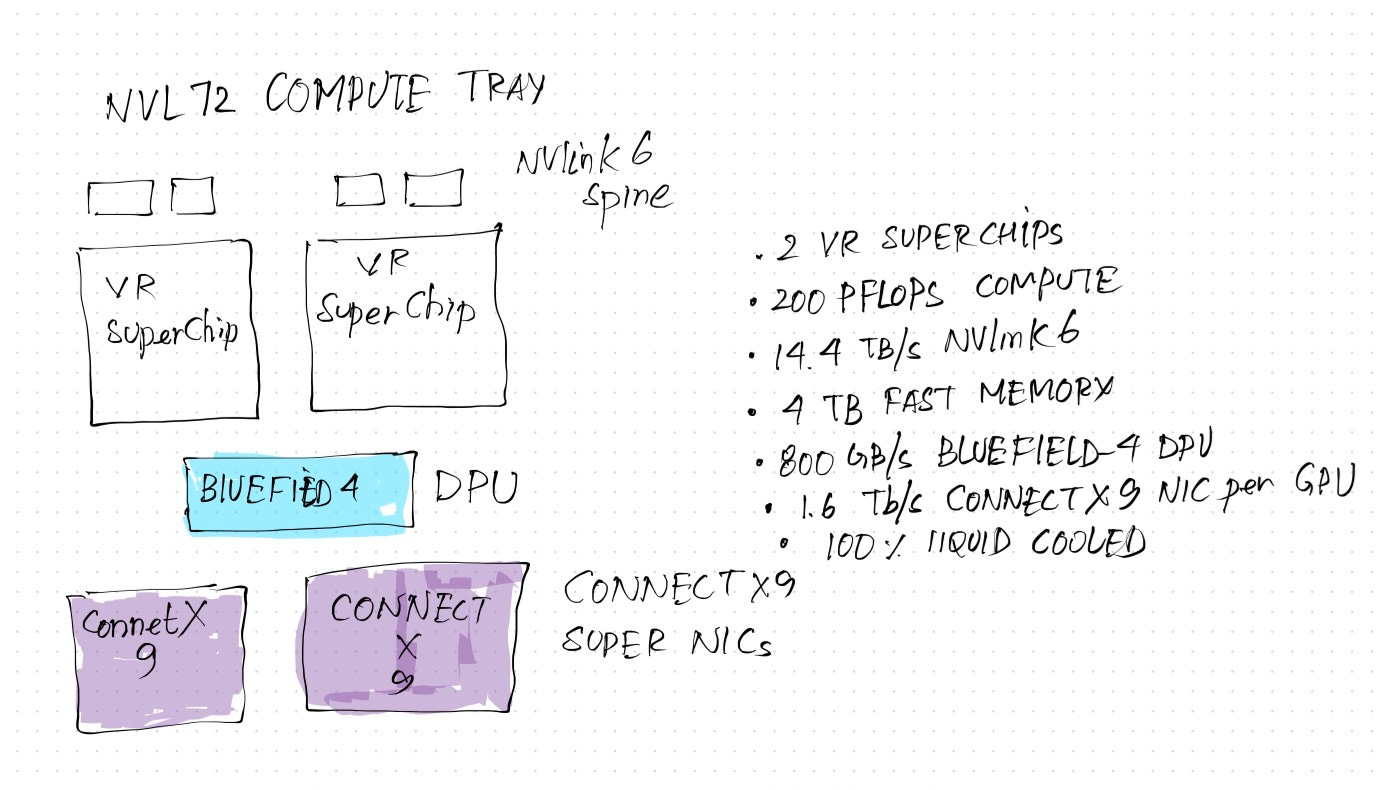
The compute tray combines two powerful superchips together with a BlueField-4 Data Processing Unit (DPU) to provide a tray that can run heavy AI workloads in an independent environment. This tray contains:
2x Vera Rubin superchips.
1x BlueField-4 DPU
NVMe SSD enclosure (not shown in the diagram) for providing flash-based extended KV cache storage.
2x Nvidia Connect X9 high speed network end-point.
NVLink 6 Spine.
NVLink and Connect X9 (networking)
On the networking side, there are two major elements that make the tray work inter-operably across racks:
NVLink 6 and NVLink 6 spine
Connect X9
NVLink 6 is the networking/switching fabric which connects the GPU to an NVLink switch. These switches are then connected together via the NVLink Spine. All of these are very high bandwidth networks with in-built compute available for performance and scale. All in all, they allow GPUs to talk to each other inside the tray.
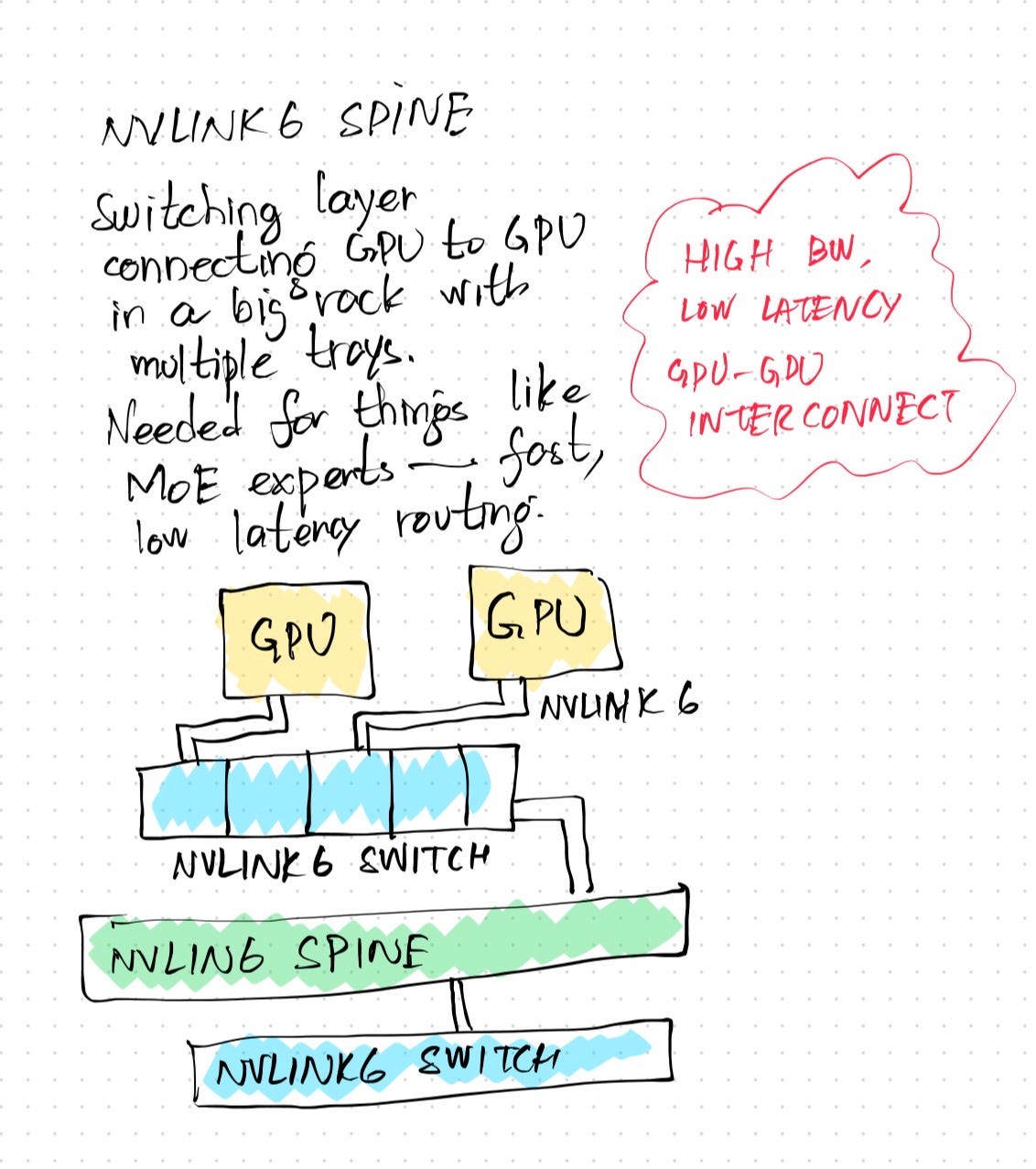
Connect X9 is a high-speed super networking interface which connects a single superchip beyond a single NVL72 rack. Therein lies the subtle distinction:
Inside an NVL72 rack, GPUs use NVLink 6 to communicate with other elements. This is an important part of the networking architecture because without this, Mixture of Expert models cannot effectively work — that is, routing tokens to experts that may be sitting across the rack. This may also explain why current versions of Google’s TPU cannot run MoE models because the architecture does not support this.
Across racks in a data center, Connect X9 provides the high-speed networking fabric to connect those GPUs to every other GPU available across racks. This super NIC provides a very high level of throughput per GPU.
Both NVLink and Connect X9 don’t only provide networking: they carry within themselves compute and other mechanisms for aiding fast movement of data back and forth such as security, encryption, data integrity checking, among others.
BlueField Data Processing Unit
Apart from the networking element, the other interesting part is the BlueField-4 DPU. It provides separate, dedicated compute, storage and control plane on the tray that does not depend on the host (superchip) for compute or other needs. This ensures that the superchip is dedicated to AI workloads. For the tray to do everything else, it depends on the DPU to provide resources, security, telemetry and control. A side effect of that is it keeps the infrastructure for the tray isolated and separate from the superchip, so even in the event that a particular superchip is saturated under load or compromised or even not properly working, it doesn’t affect the entire tray.
In other words, it won’t be wrong to call the DPU the operating system powering the AI factory (made up of many superchips). The AI factory is an important classification. The entire rack is composed of many GPUs inside superchips which are capable of running many different kinds of AI workloads. These GPUs need to interoperate not only with the Vera CPUs on board, but also with other GPUs scattered throughout the stack. This requires having mechanisms to securely move data and operations across trays and superchips. Doing all that requires networking, security, management, compute, storage, and trust. If those are shared with the GPUs and CPUs inside superchips, they take away from the resources that are available for AI workloads. That’s the main role DPU plays as a dedicated, physical unit on each tray. It excludes the superchips from the infrastructure tax, by providing all of this itself.
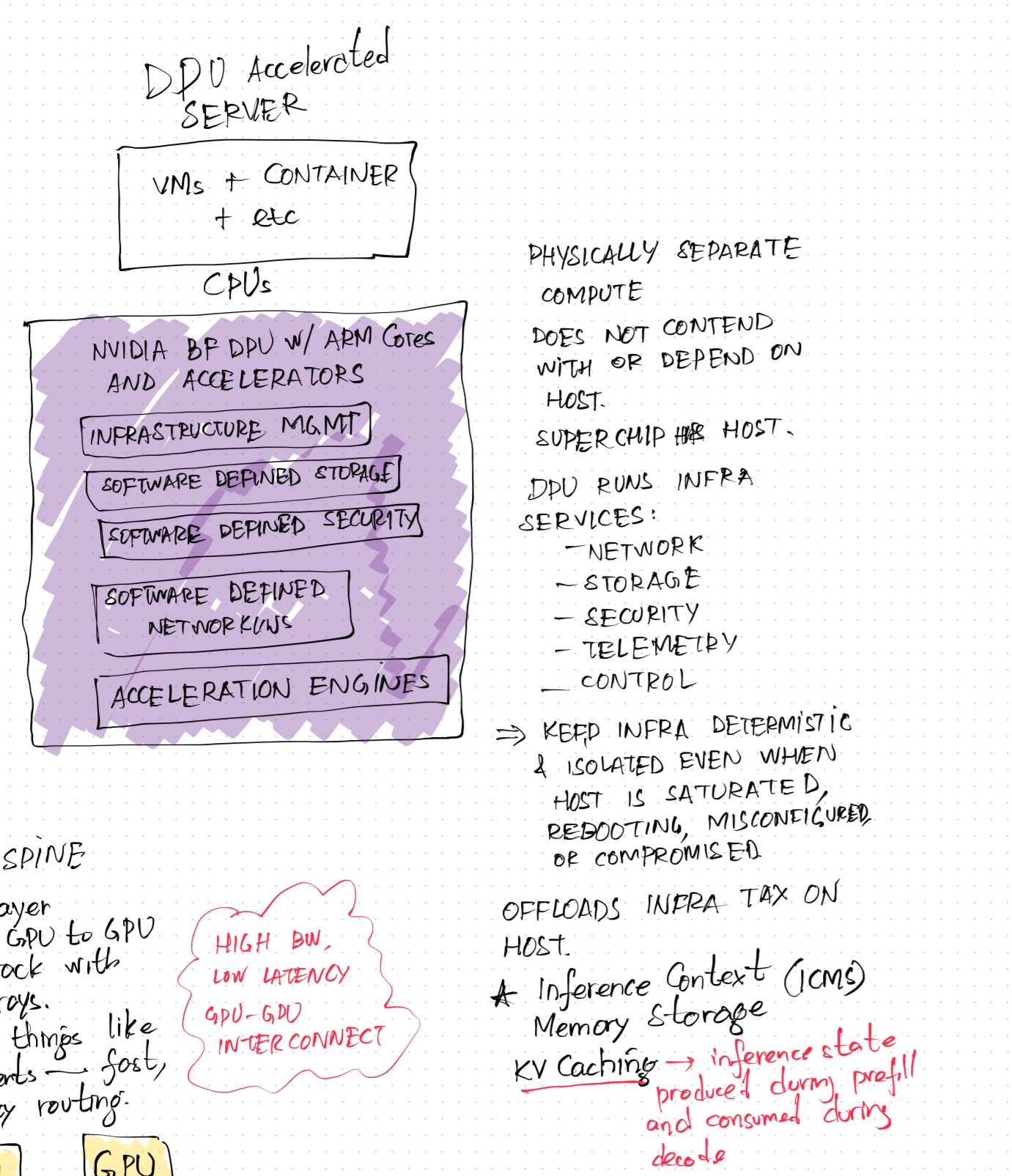
In the Vera Rubin platform, the DPU plays another important role: The Inference Context Memory Storage (ICMS). This extends the context memory available to large reasoning models by providing access to NVMe-based flash storage for not only storing the KV cache, but also mechanisms for quickly off-loading and on-loading the HBMs for low-latency, fast access to KV cache for inference during the decode phase without affecting the prefill phase.
Inference Context Memory System
KV cache is populated during the prefill phase of inference. It’s used for look-ups during the decode phase of inference, which is where the output is generated. The bigger, faster the KV cache, the quicker the response is. There are several locations where KV cache can be saved:
The HBMs closest to the GPU which provide the fastest access to cache but are limited in size.
Memory available to the superchip, which in this case is the LPDDR5 modules, among others.
Local NVMe SSD storage available to the host.
ICMS.
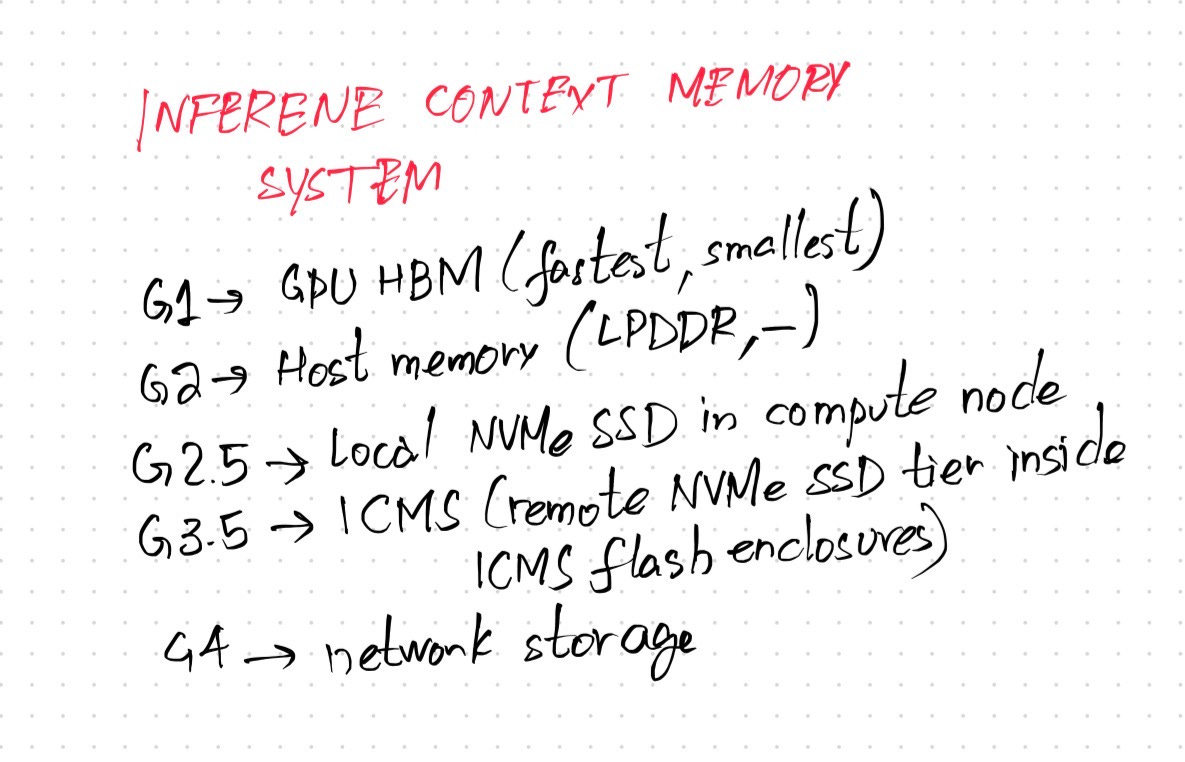
Now, ICMS is many things, but in particular, two that are important:
It provides an enclosure that houses several fast NVMe SSDs which provide flash-based storage for the cache.
It off-loads the compute needed for the superchip to move data from other KV cache layers to the ICMS layer. That means that the superchip doesn’t have to expend resources trying to load and unload data from any of the cache layers on the superchip, and loading it into the ICMS enclosure, and vice versa. Not to mention figuring out a secure, trustworthy way for data to move back and forth.
Why is this needed? Reasoning models require a larger amount of context for AI workloads to provide more user value. Agentic workflows, for example, require even more context memory in order to deliver useful results. Existing KV cache mechanisms are limited by storage size and latency. When larger reasoning models are run with exhaustive workloads, the KV cache becomes the bottleneck. The ICMS is Nvidia’s current solution to attempting to provided an extended KV cache for bigger models and extensive, agentic workloads.
All in all, and this is an oversimplification, but the BlueField-4 powered DPU takes care of all the overhead that’s needed to make this possible by keeping it isolated from the superchips and their workloads, while at the same time providing low-latency, fast access to storage in a secure manner. The term used to describe this is “scale-out”: scaling the AI factory out across many racks in a data center, each rack running 18 trays of two superchips each.
Conclusion
This was an oversimplification, but a way for me to better understand the architecture of the VR platform. Zooming out, one can see the huge amount of compute, storage, and networking available within a single rack, dedicated to AI alone. Putting many racks together and seamlessly connecting them together without sacrificing latency and performance pave the way for building AI factories at scale.
Thank you for reading.